As configurações do BGP via CLI para os equipamentos baseados no Comware 7 diferem um pouco em relação aos Switches e Roteadores baseados no Comware 5.
Basicamente para o Comware 7, uma vez dentro do processo BGP, basta habilitar o ‘peering’ com o roteador vizinho normalmente, mas a grande diferença está no anuncio de prefixos, pois uma vez que você necessite anunciar prefixos IPv4 ou IPv6, será necessário entrar no address-family, ativar o peering e aplicar o comando network, import (redistribute) etc.
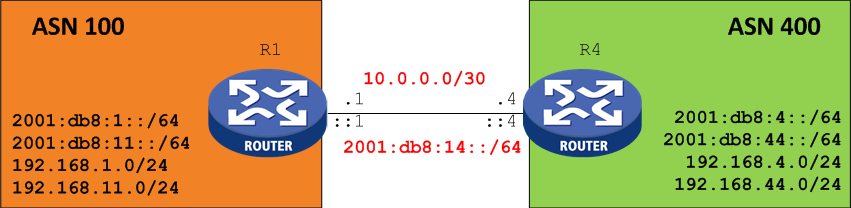
Para ficar mais fácil, veja o exemplo abaixo o peering eBGP entre o Roteador R1 (AS 100) e R4 (AS 400):
<R1> display current-configuration configuration bgp
bgp 100
peer 10.0.0.2 as-number 400
#
 address-family ipv4 unicast
    network 192.168.1.0 255.255.255.0
    peer 10.0.0.2 enable

<R4> display current-configuration configuration bgp
bgp 400
peer 10.0.0.1 as-number 100
#
 address-family ipv4 unicast
  network 192.168.2.0 255.255.255.0
  peer 10.0.0.1 enable
O ponto mais importante dessa configuração é definir o IPv4 unicast address family e ativar o peer. Perceba que as redes deverão ser anunciadas dentro do address family correto.
Para validar o peering:
<R1>display bgp peer ipv4 unicast
BGP local router ID: 192.168.1.1
Local AS number: 100
Total number of peers: 1 Peers in established state: 1
* - Dynamically created peer
Peer     AS   MsgRcvd MsgSent OutQ PrefRcv Up/Down State
10.0.0.2 400   125     118     0    2       01:47:39 Established
IPv6
O mesmo vale se o peering e/ou prefixos for para endereços IPV6
<R4>display current-configuration configuration bgp
#
bgp 400
 peer 2001:DB8:14::1 as-number 100
 #
  address-family ipv6 unicast
   network 2001:DB8:4:: 64
   network 2001:DB8:44:: 64
   peer 2001:DB8:14::1 enable
Para validar o peering BGP com endereço IPv6:
 <R4>display bgp peer ipv6 unicast
 BGP local router ID: 192.168.44.4
 Local AS number: 400
 Total number of peers: 1          Peers in established state: 1
  * - Dynamically created peer
Peer             AS  MsgRcvd  MsgSent OutQ PrefRcv Up/Down  State

2001:DB8:14::1   100 60       60      0     2 00:47:40 Established
Para validar a tabela BGP basta preencher conforme o output abaixo: IPv4, IPv6, vpnv4, vpnv6, etc..
<R4>display bgp routing-table ?
  dampened   Display dampened BGP routes
  flap-info  Display BGP route flap information
  ipv4       Specify the IPv4 address Family
  ipv6       Specify the IPv6 address Family
  vpnv4      Specify the VPNv4 address family
  vpnv6      Specify the VPNv6 address family
Até logo.
 COMUTADORES