Dica enviada pelo Samuel Alencar de Fortaleza/CE, sobre a configuração de um IRF em Switches HP 5500 (JG543A) utilizando o módulo traseiro com interfaces CX4 (JD360B).
Ele foi bastante gentil em compartilhar com o Blog o script final da configuração. Aproveitem!
CONFIGURAÇÃO DO SWICTH A
PASSO 0
<HP> reset saved-configuration
<HP> reboot
! reinicie o switch e não salve a configuração.
PASSO 3
[HP] irf member 1 priority 32
[HP] int tengigabitethernet 1/1/1
[HP –Ten-GigabitEthernet1/1/1] shutdown

[HP] irf-port 1/1
[HP – irf-port] port group interface tem 1/1/1
[HP] int TenGigabitEthernet 1/1/1
[HP –Ten-GigabitEthernet1/1/1] undo shutdown
[HP] irf-port-configuration active
[HP] save
CONFIGURAÇÃO DO SWICTH B
PASSO 1
! Desconecte os cabos do IRF
<HP> reset saved-configuration
<HP> reboot
! reinicie o switch e não salve a configuração.
PASSO 2
[HP] irf member  1 renumber 2
[HP] quit
<HP> reboot
PASSO 4
[HP] irf member 2 priority 31 [HP] int tengigabitethernet 2/2/2 [HP –Ten-GigabitEthernet2/2/2] shutdown
[HP] irf-port 2/2 [HP – irf-port] port group interface tem 2/2/2 [HP] int TenGigabitEthernet 2/2/2 [HP –Ten-GigabitEthernet2/2/2] undo shutdown [HP –Ten-GigabitEthernet2/2/2] quit [HP] irf-port-configuration active [HP] save ! Reconecte os cabos e se o switch não reiniciar automaticamente, digite ! o comando 'irf-port-configuration active'.
Galera, segue abaixo a dica para liberar a configuração de algumas funcionalidades via CLI para os Switches HP 1950.
O comando “xtd-cli-mode” no modo user-view libera a configuração “avançada” do Switch via CLI.
Após digitar o comando aparecerá a imagem de warning abaixo. A senha é: foes-bent-pile-atom-ship
<HPE>xtd-cli-mode
All commands can be displayed and executed in extended CLI mode. Switch to extended CLI mode? [Y/N]:Y
Password:
Warning: Extended CLI mode is intended for developers to test the system. Before using commands in extended CLI mode, contact the Technical Support and make sure you know the potential impact on the device and the network.
Após isso os comandos abaixo serão liberados:
<HPE>?
User view commands:
  archive             Archive configuration
  backup              Backup the startup configuration file to a TFTP server
  boot-loader         Software image file management
  bootrom             Update/read/backup/restore bootrom
  cd                  Change current directory
  cfd                 Connectivity Fault Detection (CFD) module
  clock               Specify the system clock
  copy                Copy a file
  debugging           Enable system debugging functions
  delete              Delete a file
  diagnostic-logfile  Diagnostic log file configuration
  dir                 Display files and directories on the storage media
  display             Display current system information
  exception           Exception information configuration
  fdisk               Partition a storage médium
  fixdisk             Check and repair a storage médium
  format              Format a storage médium
  free                Release a connection
  ftp                 Open an FTP connection
  gunzip              Decompress file
  gzip                Compress file
  install             Perform package management operation
  lock                Lock the current line
  logfile             Log file configuration
  md5sum              Compute the hash digest of a file using the MD5 algorithm
  mkdir               Create a new directory
  monitor             System monitor
  more                Display the contents of a file
  move                Move a file
  oam                 OAM module
  ping                Ping function
  process             Process management
  pwd                 Display current working directory
  python              Source using python script
  quit                Exit from current command view
  reboot              Reboot operation
  rename              Rename a file or directory
  reset               Reset operation
  restore             Restore next startup-configuration file from TFTP server
  rmdir               Remove an existing directory
  save                Save current configuration
  scheduler           Scheduler configuration
  scp                 Establish an SCP connection
  screen-length       Multiple-screen output function
  security-logfile    Security log file configuration
  send                Send information to other lines
  sftp                Establish an SFTP connection
  sha256sum           Compute the hash digest of a file using the SHA256
                      algorithm
  ssh2                Establish a secure shell client connection
  startup             Specify system startup parameters
  super               Switch to a user role
  system-view         Enter the System View
  tar                 Archive management
  tclquit             Exit from TCL shell
  tclsh               Enter the TCL shell
  telnet              Establish a telnet connection
  terminal            Set the terminal line characteristics
  tftp                Open a TFTP connection
  tracert             Tracert function
  undelete            Recover a deleted file
  undo                Cancel current setting
  web                 Web configuration
  xml                 Enter XML view
  xtd-cli-mode        Switch to extended CLI mode to display and execute all commands (special authorization required)
O empilhamento de switches, também conhecido como stacking permite configurar diversos switches como se fossem um único switch lógico, simplificando drasticamente a administração da sua rede e aumentando significativamente a disponibilidade e o desempenho.
Neste vídeo completo, você aprenderá a configurar o IRF (Intelligent Routing and Forwarding) em switches 3Com, H3C e HP baseados no Comware:
Introdução ao empilhamento de switches: Descubra os principais benefícios dessa tecnologia e como ela pode otimizar sua rede.
Funcionamento do IRF: Compreenda os conceitos básicos do IRF e como ele transforma switches físicos em um único switch lógico.
Configuração passo a passo: Siga as instruções detalhadas para configurar o IRF em seus switches 3Com ou HP com Comware.
Gerenciamento simplificado: Aprenda a gerenciar o switch empilhado como um único dispositivo, reduzindo o tempo e o esforço necessários para a administração da rede.
Maior disponibilidade: Elimine pontos únicos de falha e garanta a alta disponibilidade da sua rede, mesmo em caso de falha de um switch individual.
Melhor desempenho: Distribua o tráfego de forma inteligente entre os switches empilhados, otimizando o desempenho geral da rede.
Aula 8 do Treinamento Comware para Switches HP. As ACLs, também chamadas de listas de acesso, são utilizadas para determinar se um pacote será permitido ou descartado pelo switch/roteador com as ações PERMIT ou DENY.
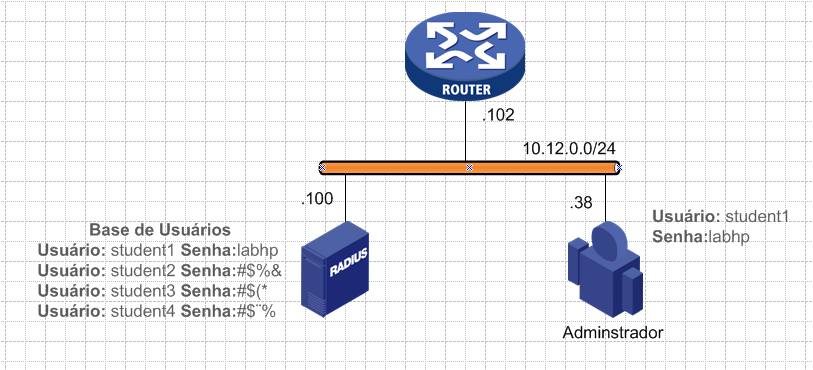
A autenticação em Switches e Roteadores para fins de administração dos dispositivos pode ser efetuada com uma base de usuários configurados localmente ou em uma base de usuários remota que pode utilizar servidores RADIUS ou TACACS.
No exemplo abaixo montamos um ‘How to’ com o auxílio do Derlei Dias, utilizando o FreeRADIUS no Slackware para autenticação em um roteador HP VSR1000 que possui como base o Comware 7.
Instalando Freeradius no Slackware
1 – Baixe os pacotes do slackbuilds.org e instale normalmente;
2 – Após instalação vá na pasta /etc/raddb/certs e execute o bootstrap;
3 – Usando de forma simples sem base de dados, abra o arquivo /etc/raddb/users;
4 – Adicione na primeira linha: student1 Cleartext-Password := “labhp” ! Usaremos como exemplo o usuário ‘student1’ com a senha ‘labhp’
5 – Depois use o comando a seguir para testar: radtest student1 labhp localhost 0 testing123 ! O ‘testing123’ servirá como chave para autenticação entre o Switch/Roteador e o Radius
6 – A resposta deverá ser essa, se a autenticação ocorrer com sucesso:
Sending Access-Request of id 118 to 127.0.0.1 port 1812
User-Name = "student1"
User-Password = "labhp"
NAS-IP-Address = 10.12.0.102
NAS-Port = 0
Message-Authenticator = 0x00000000000000000000000000000000
rad_recv: Access-Accept packet from host 127.0.0.1 port 1812, id=118, length=20
7 – Lembre-se que ao inserir usuários no arquivo você deverá reiniciar o RADIUS.
8 – Editar o arquivo clients.conf e permitir a rede que fará acesso ao servidor.
10 – Alguns dispositivos requerem uma configuração especial no clients.conf e no users:
Configuração no RADIUS para Switches/Roteadores HP baseados no Comware7
Após ocorrer a autenticação do usuário com sucesso, o servidor RADIUS irá retornar uma das CiscoAVPairs para a autorização da ‘role’ que o usuário deve obter quando autentica no dispositivo. Você pode usar o network-admin, ou o network-operator, ou alguma role criada para RBAC.
Configurando o Comware7
#
interface GigabitEthernet1/0
 ip address 10.12.0.102 255.255.255.0
#
radius scheme rad
 primary authentication 10.12.0.100 key cipher $c$3$5mQHlUeQbVhRKAq3QxxN0NiB0Sc8jbyZFKyc3F0=
 primary accounting 10.12.0.100 key cipher $c$3$Q12zYBjRIkRGeQQL6gYm4wofbMfjDl/Cqalc17M=
 accounting-on enable
 user-name-format without-domain
! É possível enviar o usuário com ou sem o formato @dominio
nas-ip 10.12.0.102
#
domain bbb
 authentication login radius-scheme rad
 authorization login radius-scheme rad
 accounting login radius-scheme rad
#
 domain default enable bbb
#
user-vty 0 63
authentication-mode scheme
Aula 7 do Treinamento Comware para Switches HP. O acrônimo AAA é uma referência aos protocolos relacionados com os procedimentos de autenticação, autorização e contabilidade. Vários métodos, tecnologias e protocolos podem ser usados para implementar o controle de identidade e acesso, fornecendo informações sobre a validade das credenciais, direitos de acesso e auditoria. Como continuidade demonstramos a configuração do RADIUS e TACACS+ para gerenciamento dos Switches e Roteadores.
Aula 6 do Treinamento Comware para Switches HP. Nesse vídeo demonstramos o funcionamento do empilhamento ou stacking com IRF. A funcionalidade é utilizada para configuração de diversos switches em um único switch lógico. Todos os equipamentos serão visualizados como uma única “caixa”, aumentando a disponibilidade da rede.
O Fax (abreviação de fac-símile) é a transmissão telefônica de material impresso digitalizado (texto e imagens), normalmente para um número de telefone conectado a uma impressora ou outro dispositivo de saída.
O protocolo T.38 permite transmitir mensagens de fax através de uma rede IP em tempo real (na velocidade da transmissão). Os aparelhos de FAX não necessariamente precisam obter informações sobre a rede e podem continuar a enviar as suas mensanges no padrão T.30.
O padrão T.38 Fax Relay foi concebido em 1998 como uma maneira de permitir que a mensagem via fax a seja transportadas através de redes IP entre terminais de fax existentes no padrão do Grupo 3.
Existem outros protocolos de envio de FAX sobre IP mas o padrão do ITU é o T.38.
Como T.38 Fax Relay funciona?
Os dados modulados pelo fax analógico são digitalizados pelo DSP (Digital Signal Processor) no gateway e as informações são geradas em binário.
A informações em binário são encapsuladas no pacote T.38 e então transportada pela rede IP.
O DSP no gateway de destino extrai a informação transportada pelo pacote T.38 e modula dentro do sinal de fax analógico tradicional.
Configuração
No exemplo abaixo utilizaremos o mesmo exemplo do Configuration Guide do MSR 3012 para Voz, utilizando SIP entre duas localidades.
Aula 4 do Treinamento Comware para Switches HP. Nesse vídeo explicamos o funcionamento do VRRP, do DHCP e a configuração dos Switches e Roteadores baseados no Comware como Servidores DHCP como também os cenários para uso da funcionalidade DHCP-Relay.



 COMUTADORES